Sunday, July 8, 2012

Does megapixel count matter when taking photos?


One of the features a point-and-shoot camera will brag about is its megapixel count. Most people will only care about that when buying a new camera. They simply forget or are not aware of the other little details that impact on the image quality.

In order to verify if megapixel count really matters, I did a simple test in extreme low light conditions and saw how the two cameras perform.


Canon Powershot A2200

This is one the cheapest point-and-shoot camera from Canon.  A Q1 2011 camera costing only US$ 99 at Amazon.I managed to pay only R$200 ( I live at Brazil) on Kabum.com.br. I wanted a compact that I could carry with me for every I would go. This was the cheapest camera I found that met the criteria.  It features a 14.1 megapixel sensor, Digic 4 processor and Canon Zoom Lens 5-20mm 1:2.8-5.9 capable of 4x zoom.  Being a cheap camera, it lacks image stabilization, a very important feature for night and zoom shots. Although it is a Canon lens, we cannot expect quality from such tiny lens. And it is made on China, not Japan.

This is photo that I took at night from my bathroom window leaning on the windowsill to prevent shake.  The photo has 4320x3240 pixels, focal length 6.36mm,  F/3.2 8s ISO 80. I wish I could tell the camera to use a smaller aperture, but there is not way of doing that.


Sony Cyber-Shot DSC-H5


Cyber-shot is certainly most popular brand for consumer cameras. But popularity does not necessary reflects good image quality. But in case of this Q1 2006  7.2 megapixels camera it does. Mostly because it features  a Carl Zeiss Vario-Tessar 2.8-3.7/6-72mm lens instead of the common Sony G lens that is used on most of the Cyber-shot lineup. That detail really makes that camera special.  This japanese made camera also has image stabilization.

 A shot taken with the DSC-H5 from the same point: 3072 × 2304, focal length 6mm, F/8, 30s ISO 80


The moment of truth 

Here is a 100% crop for the DSC-H5 (left side)  along with a crop for the same area from the image captured by the A2200.
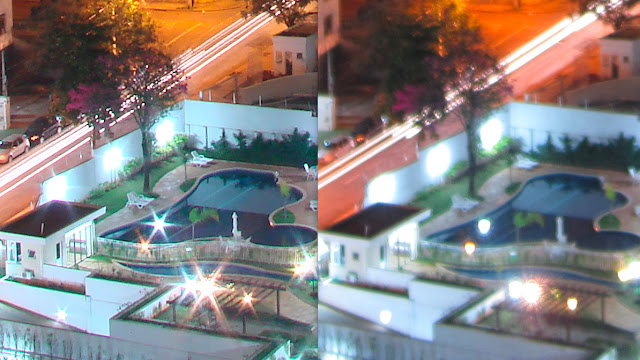


DSC-H5 has a shaper image even though the A2200 has almost the double of pixels. Contrast,  exposition and white balance are very similar on both imagse. A2200's image looks like a blurry version of DSC-H5's

Closing Remarks

Megapixel count do matter, but they are not essential. They should be enough to present all the image details in the target format. Agood sensor and quality lens will make the difference.

Saturday, April 7, 2012

First Attempts with Lego Mindstorms NTX 2.0

I knew that Lego have done some robotics kits. You would program a big brick, connect motors and sensors and start the fun. Well, buying the kit at Brazil is pretty expensive: US$ 1000 by today's exchange rate. I found that if I import directly from Amazon  I could get it for US$ 600, import taxes included !


Okay, here is my first robot. It's the basic starter model. I program it to avoid bumping into objects.


My second Robot was the ColorSorter.  That one also comes with the kit.


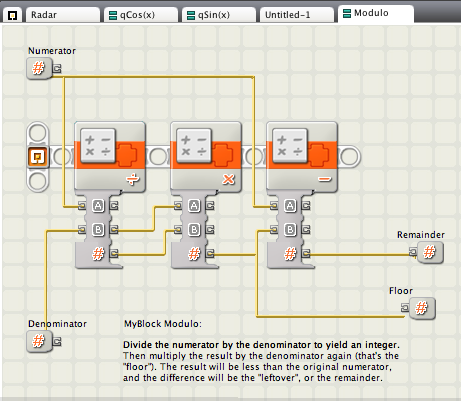
The kit comes with a NXT-G, a graphical programing environment based on LabView from National Instruments. When I said Graphical, I mean you have to drag blocks and make connection to program.  See how hard is only to implement the modulo function :


It is not only hard to people used to program by "typing code", but it also generates big and sluggish programs. And program size really matters as memory is scarce.  The alternative I found was Bricxcc, a Windows IDE for NXC ( Not eXactly C) , a C like language to programming the NXT2.0.

Here is the code for the Color Sorter Robot above. It is a direct translation  of the NXT-G code that comes with the kit. I haven't done any improvements to make the robot smatter.

/*
  Lego color sorter
  Attempt to convert from NXT-G to NXC
*/

#define COLOR_SENSOR SENSOR_3
#define TOUCH_SENSOR1 SENSOR_2
#define TOUCH_SENSOR2 SENSOR_1


#define PRESSED 1
#define NOT_PRESSED 0
#define UNTIL_BUMPED(x)  until((x) == PRESSED);until((x) == NOT_PRESSED);

enum color_t {
  BLUE = INPUT_BLUECOLOR,
  RED = INPUT_REDCOLOR,
  YELLOW = INPUT_YELLOWCOLOR,
  GREEN = INPUT_GREENCOLOR
};


sub initializeSensors(){
    //Color Sensor
    SetSensorColorFull(IN_3);
    //Touch sensor 1
    SetSensorTouch(IN_2);
    //Touch sensor 2
    SetSensorTouch(IN_1);
}


task main(){
     initializeSensors();
     
     OnFwd(OUT_C,50);
     until(TOUCH_SENSOR1 == PRESSED);
     RotateMotor(OUT_C,50,55);
     while(true){
         color_t color  = COLOR_SENSOR;
         
         switch(color){
                       case BLUE:
                            //PlaySound wait for completion
                            OnFwd(OUT_B,50);
                            UNTIL_BUMPED(TOUCH_SENSOR2);
                            RotateMotor(OUT_B,50,0.8*360);
                            Wait(MS_300);
                       break;
                       
                       case RED:
                            //PlaySound
                            RotateMotor(OUT_C,40,90);
                            OnFwd(OUT_B,50);
                            UNTIL_BUMPED(TOUCH_SENSOR2);
                            RotateMotor(OUT_B,50,0.8*360);
                            RotateMotor(OUT_C,40,270);
                       break;
                       
                       case YELLOW:
                            //PlaySound
                            RotateMotor(OUT_C,40,180);
                            OnFwd(OUT_B,50);
                            UNTIL_BUMPED(TOUCH_SENSOR2);
                            RotateMotor(OUT_B,50,0.8*360);
                            RotateMotor(OUT_C,40,180);
                       break;
                            
                       case GREEN:
                            //PlaySound
                            RotateMotor(OUT_C,40,270);
                            OnFwd(OUT_B,50);
                            UNTIL_BUMPED(TOUCH_SENSOR2);
                            RotateMotor(OUT_B,50,0.8*360);
                            RotateMotor(OUT_C,40,90);
                       break;
                       
                       default:
                           //Play Sound - try again
                            OnFwd(OUT_B,50);
                            UNTIL_BUMPED(TOUCH_SENSOR2);
                            RotateMotor(OUT_B,50,0.8*360);

         }
     }
}